
Browse documentation
MOXA, social
How MOXA plans a week of social posts from your programme, drafts and checks each one, holds it for a second person to approve, and helps your leaders post from their own accounts.
MOXA plans, writes and checks; a person approves every post
MOXA is the social team lead. It plans your week of posts across the channels you connect, writes each post, runs five checks on it, and puts it in front of a named person. It publishes only what that person approved, then reads back how the post did and listens for comments and mentions.
MOXA is in Beta. Every page header carries the chip, and its note lists what is built: "plan, write, check, publish, listening, creators, insights, trends and strategy. Coming soon: the Marketing thread and the people seats."
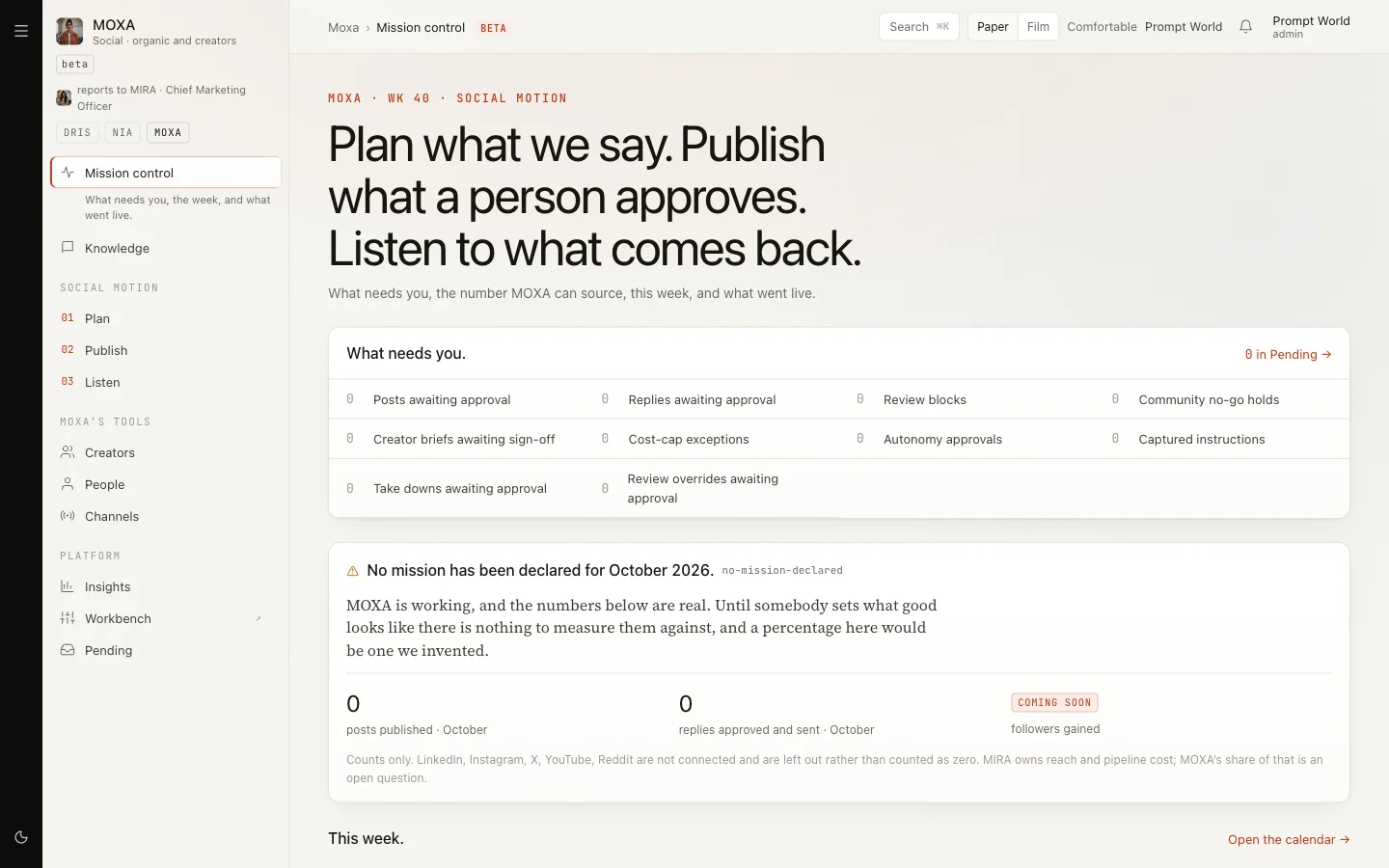
Open it from the sidebar under MOXA, or go to nagent.ai/admin/moxa. The rail down the left reads Mission control and Knowledge, then 01 Plan, 02 Publish and 03 Listen, then Creators, People and Channels, then Insights, Workbench and Pending.
The programme: what MOXA plans from
Everything MOXA writes comes from your programme. It has four parts.
| Part | What it holds | Where you see it |
|---|---|---|
| Pillars | The themes you post about, each with a share of the week | Plan, Pillars tab |
| Ideas | The idea bank each slot draws on | Plan, Pillars tab |
| Never list | Phrases MOXA must never use | Knowledge |
| Channels | Which accounts are on, how often, and a daily cap | Channels |
For Prompt World, pillars might be "Prompt craft for marketers" at 50%, "Workshop stories" at 30% and "Sales enablement" at 20%, with ideas such as "Three prompts that rewrite a cold email".
Setting pillars and ideas: open Plan and the Pillars tab. You have two ways to start.
- Type them. Click Add a pillar, name it and give it a ratio; the ratios must total 100, and the page shows the running total. Put one idea per line in the idea bank, add a short brief saying what the programme is for, and click Save the programme.
- Let STRATEGY draft them. Click Draft the programme. STRATEGY reads what the workspace already holds (the brand book, your website, the documents on Knowledge, what Listen watches and what MOXA has published) and proposes three to five pillars and the first ideas, each resting on a source. Accept them one by one or with Accept all. If the workspace holds nothing to read yet, the page says what to add first.
Later, Ask TRENDS what is rising and Ask STRATEGY what to change propose new ideas and pillars for you to Accept or Dismiss. Both need material first: TRENDS needs communities, terms or competitors to watch, and STRATEGY needs about thirty published posts.
On Knowledge, type a phrase on the Never list. shelf and click Add.
Step 1: connect and switch on your channels
On Channels there is one row per account: "Nothing is scheduled to a channel that is not connected." Accounts are connected by a workspace admin under Integrations, linked at the foot of the page.
Click Edit on a row to set Publishing on, the Handle, Cadence a week and Cap a day, then Save. For a LinkedIn company page you also set the Author URN. Every channel starts switched off.
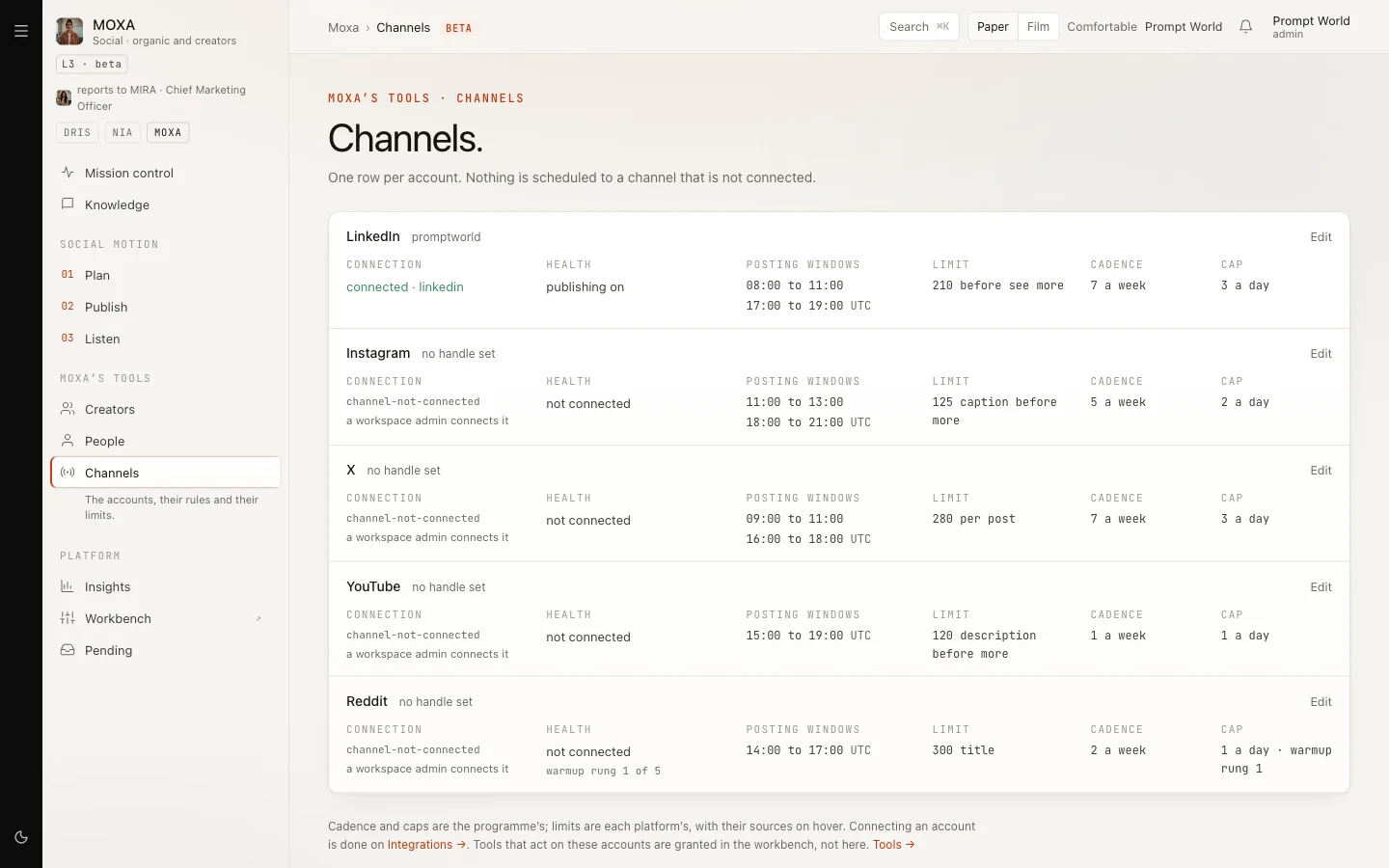
| Channel | What MOXA can post |
|---|---|
| Text and link posts. Images are posted by a person | |
| X | Text and threads. Media is posted by a person |
| Images, video and carousels. Stories are posted by a person | |
| Text and link posts, with a warm-up ladder | |
| YouTube | Always posted by a person |
LinkedIn is the channel tested end to end. Posting as a company page needs a custom LinkedIn connection that Nagent sets up with you. Connecting X does not work yet.
Step 2: plan the week
Open Plan. A week with no plan says "This week has no plan." Click Plan Wk NN and MOXA lays out slots across your switched-on channels, sharing them between pillars by their ratios.
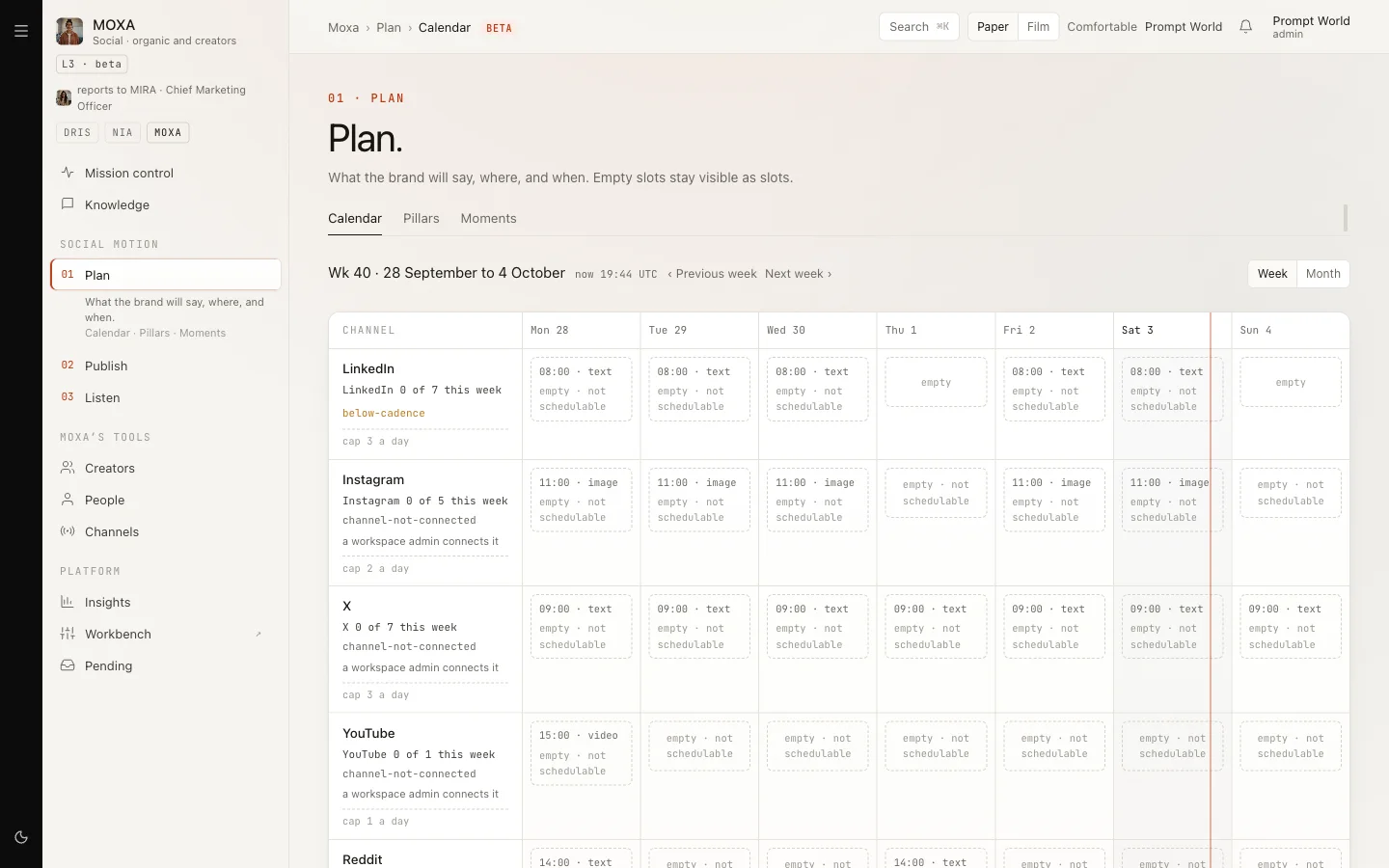
Slots on a channel that is off read "empty · not schedulable". Under the grid you can set a Target KPI per slot.
Once a week is planned there is no button to plan it again, and changing a cadence does not re-plan the current week. Change cadence before you plan.
Step 3: draft a slot
Click an empty slot to draft it from its idea. MOXA writes the post and says: "Drafted · it is in Drafts, and goes through the gate before anyone approves it". A slot with no idea cannot be drafted; it shows a short message instead.
Click a filled slot to open its Post Trace, which shows what MOXA did and what it cost, for example "Cost $0.02 · one approval".
Step 4: the gate
Go to Publish, tabs Drafts, Review, Scheduled and Published. From Drafts, click Run the checks. On Review each post shows five verdicts:
| Check | What it asks |
|---|---|
| Voice | Does it sound like your brand? |
| Claims | Is every claim one your brand supports? |
| Consent | Does everyone named or quoted agree to it? |
| Channel fit | Is it right for this channel's format and limits? |
| Community | For Reddit: would the community's rules remove it? |
From here you can Accept MOXA's fix, Edit the words, Run the checks again, Make a version for another channel or Withdraw.
A blocked post reads "This post cannot be approved." Send it back with the reason, or Ask a person to lift the block, which needs a written reason and a second person. A Reddit post the community would remove reads "This does not go out." and "No override exists."
Step 5: approval, by a second person
When the checks pass, click Ask for approval. The post then waits for a different person to Approve or Reject it. MOXA will not publish a brand post approved by the person who asked: this is the four-eyes rule.
Do not approve your own request. Today a self-approval is refused and the post is marked failed rather than left waiting, so the right person has nothing to approve. Ask a colleague instead.
Who may approve: the people named under Approvals. in the MOXA Workbench, or, if nobody is named, any workspace admin. The approval also holds the exact words: if the post changes afterwards, it will not send.
Approved posts move to Scheduled and go out at their slot. You can Hold a channel, or Hold all.
Our logic: a post speaks for your company in public and cannot be unsaid. Two people see it before it goes, and what they approved is exactly what is published.
Pending
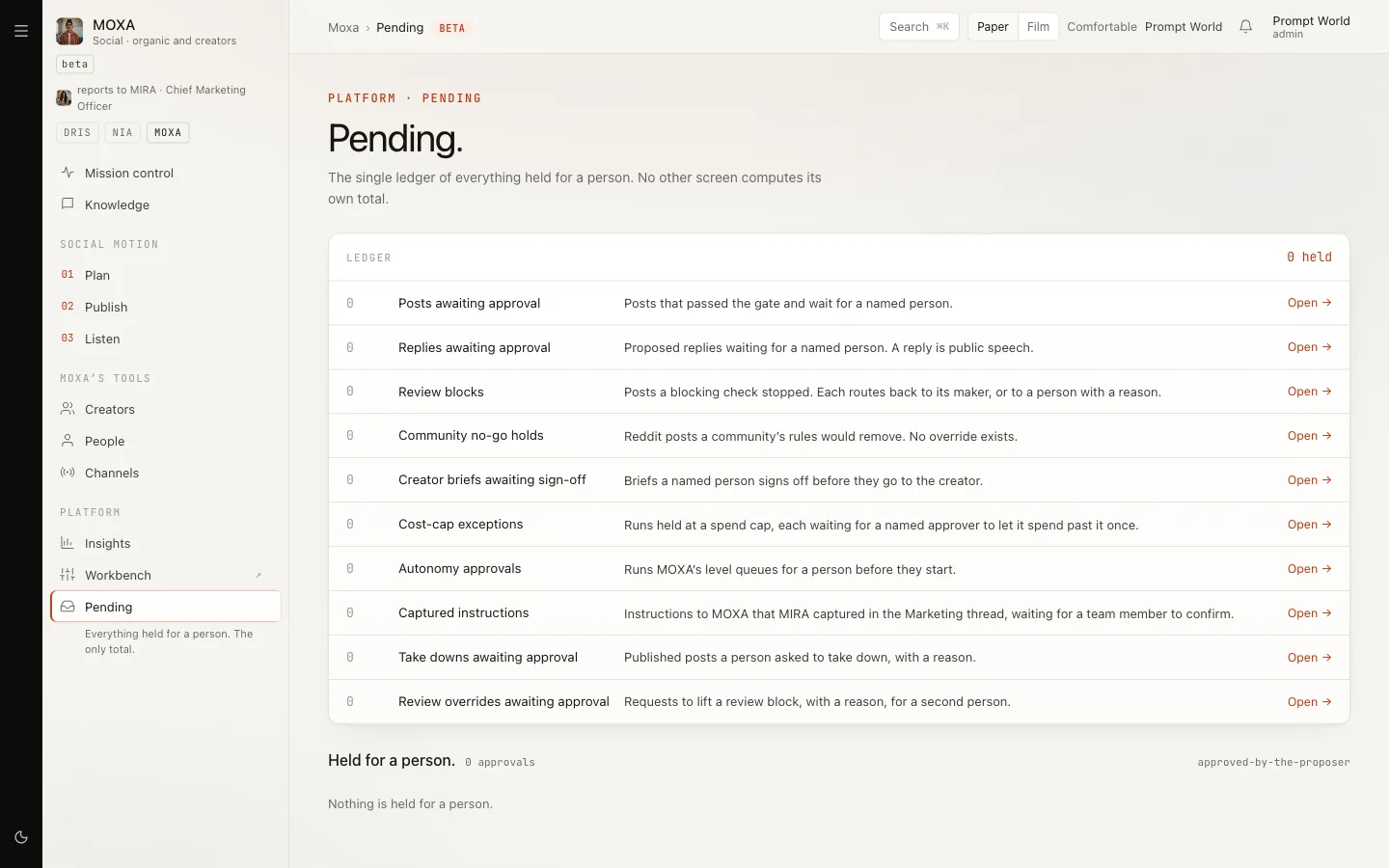
Pending is the ledger of what waits for a person: posts and replies awaiting approval, review blocks, cost-cap exceptions, autonomy approvals and take-downs. Held for a person. lists each with Approve and Dismiss. Posts drafted for a person's own account are not counted here.
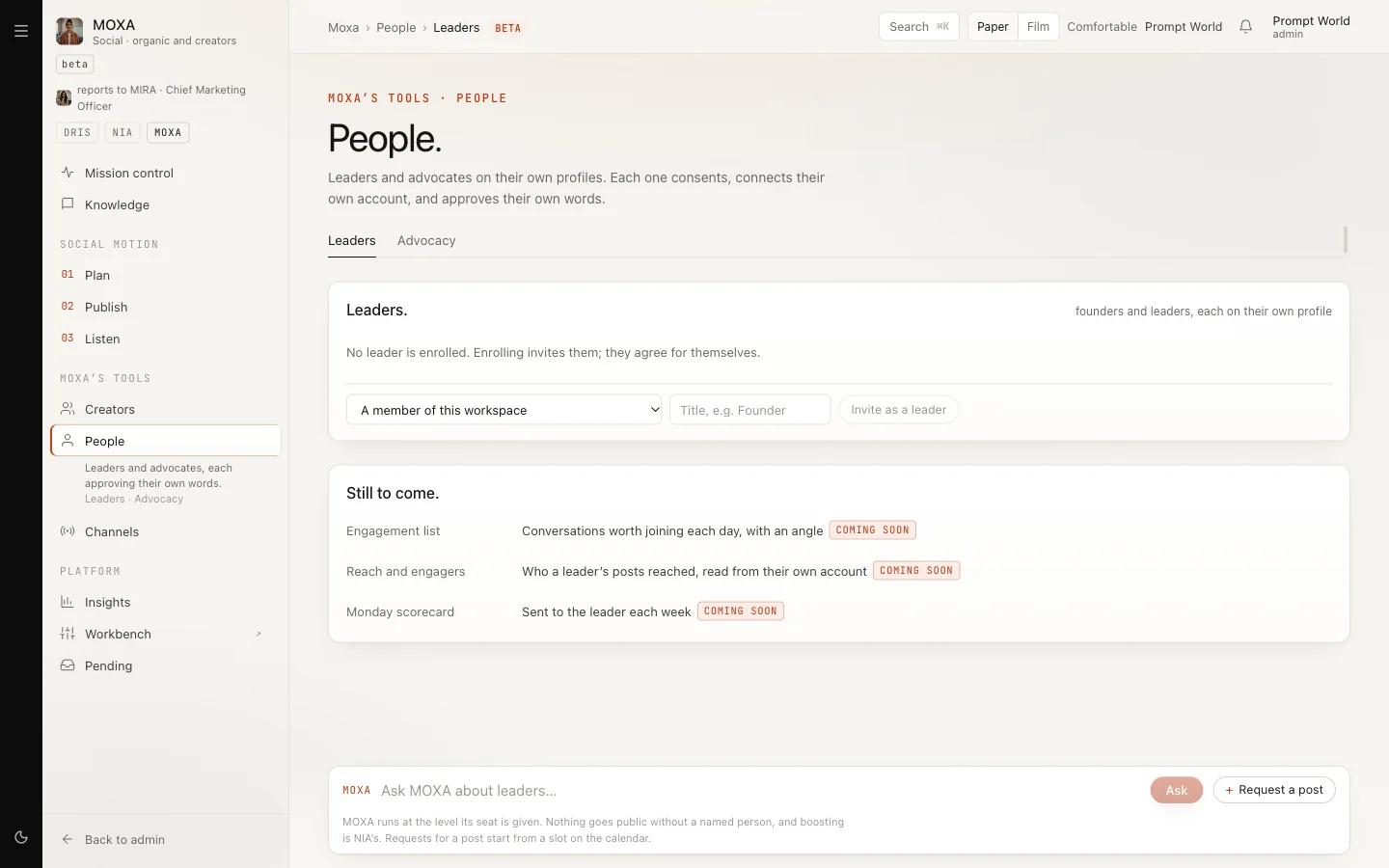
People: leaders posting from their own accounts
On People, Invite as a leader or Invite as an advocate. The person then sees their own view, starting with the consent, word for word:
MOXA may draft posts for my own LinkedIn and X from what I give it. Nothing goes out under my name unless I, or someone I name, approve those exact words. MOXA never comments, likes, follows or connects for me. I can withdraw this at any time, and anything of mine not yet published stops.
They click I agree, connect their own LinkedIn under Your own accounts., describe How you write., and paste notes. Draft three to five posts turns the notes into drafts. For each one they choose Ask to approve, post from my account or I'll post it myself. Only they, or someone they named, can approve.
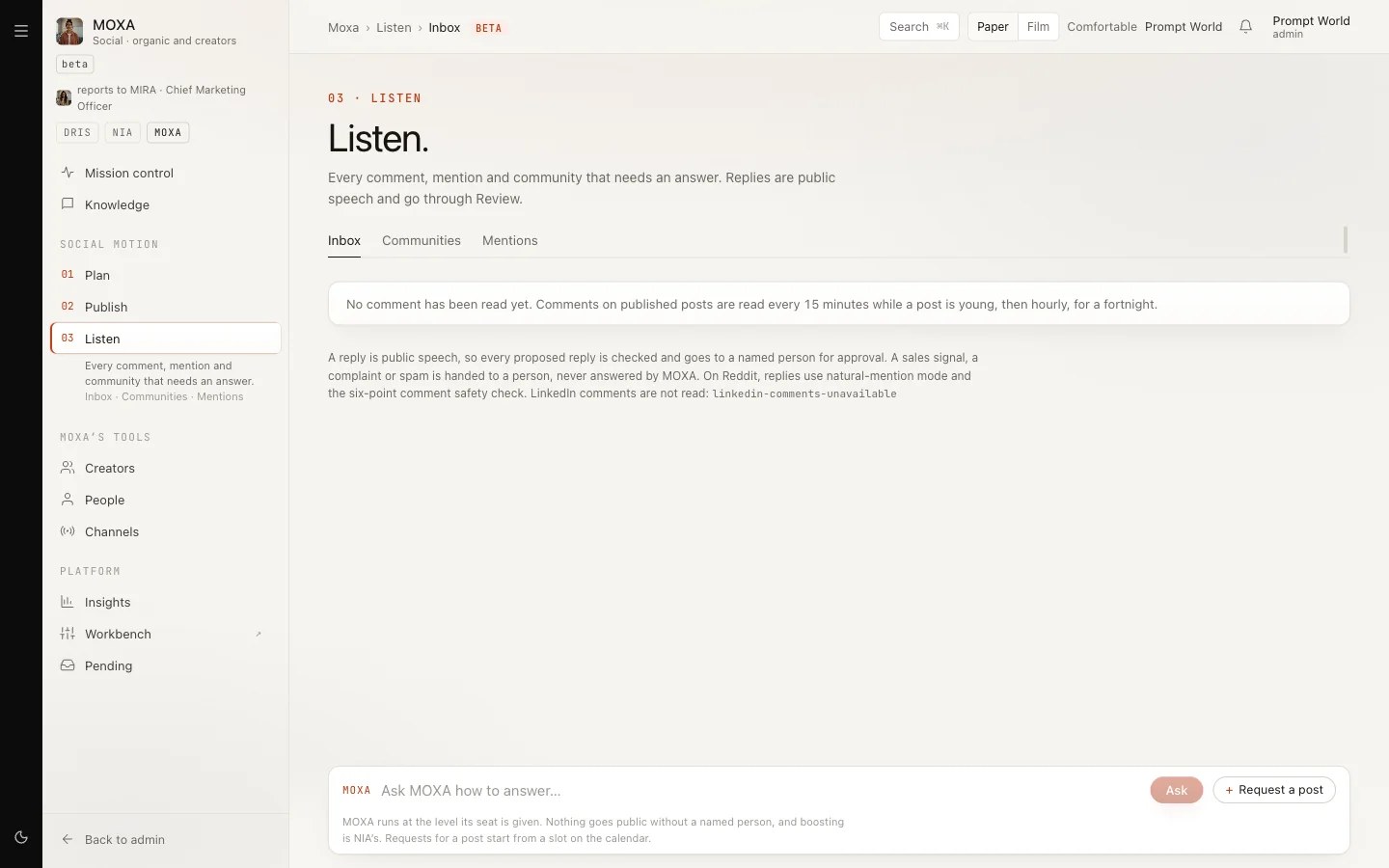
Listen
Listen has Inbox (comments read
back), Communities (Reddit communities and their rules) and Mentions
(terms to search for). LinkedIn comments are not read yet. Every state in
MOXA has a short code, such as no-plan-for-week; click a code badge to see
what it means.
What it costs
MOXA shows spend: per post in the Post Trace, "Spent this week" on the Workbench, and cost per post under Insights. Its caps default to $5 a day, $100 a month and $0.50 a call; a run that would pass a cap is held in Pending for a named approver.
Limits today
- Pillars and ideas cannot be entered on screen yet.
- A week cannot be re-planned from the page.
- X cannot be connected.
- A LinkedIn post can show as failed although it went out. Check the page before you post again.
- In a new workspace MOXA's runs may wait for approval until Nagent finishes setting it up.